


Your first few matches may feel fine. Then your forearm starts to stick, sweat builds up, and each mouse swipe feels less smooth. A gaming sleeve looks like an easy fix. In many cases, it can help with that exact problem. The health side is less simple and a sleeve may reduce friction, protect the skin, and make long sessions more comfortable. A proper compression model may also help some players with forearm fatigue or recovery after intense play.
Still, it cannot fix poor posture, heal an injured tendon, or prevent carpal tunnel syndrome. It should improve comfort, not help you ignore pain. The reason you wear the sleeve matters far more than the logo printed on it.
Do Gaming Sleeves Help Health or Just Improve Comfort?
Players use sleeves for different reasons. Those reasons do not share the same evidence. An FPS player may want a smoother glide. Another player may need protection from a rough desk edge. Someone with wrist pain may expect muscle or joint support.
The first two problems concern surface contact. The third may involve a tendon, nerve, or joint.
| Reason for use | Likely result |
|---|---|
| Sweaty forearm | Breathable fabric may reduce stickiness |
| Skin catches on the pad | Smooth material may provide a steadier glide |
| Rough pad irritates the skin | A sleeve may reduce direct friction |
| Arm feels tired after long play | Compression may help, but evidence remains limited |
| Wrist bends at a poor angle | A sleeve will not correct the position |
| Hand feels numb or weak | Rest and medical advice matter more |
| Carpal tunnel symptoms appear | A standard sleeve is not a treatment |
Surface problems may respond to a sleeve. Pain inside the wrist, hand, or elbow needs a closer look.
Friction Creates the Fastest Difference
Bare skin does not move across a desk at one steady speed. Heat, sweat, oil, humidity, and arm hair can all change the amount of drag. A sleeve replaces skin contact with fabric contact. Nylon, polyester, and spandex blends often slide with less variation. Large mouse movements may then feel easier to repeat.
Low-sensitivity players tend to notice the biggest change. They move the mouse across a wide area and place more of the forearm on the desk. High-sensitivity players make shorter movements from the wrist. Their forearms may stay almost still, so a sleeve may offer little value.
This effect is mechanical and sleeve removes some drag. It does not improve reaction time, decision skill, hand control, or accuracy on its own.
Sweat Can Change the Pad Mid-Match
A dry arm may glide well during the first match. Sweat can change that feel an hour later. Skin starts to grip the desk or mousepad. Synthetic fabric can pull moisture away from the skin. It spreads the moisture across a wider area, which helps it dry faster. The arm may feel less sticky as a result. Glass mousepads often show a clear difference. Damp skin can stick to glass. A smooth synthetic sleeve usually moves across it with less resistance.
Cloth pads are harder to predict and sleeve may work well on one pad and catch on another. Some cloth pads have a directional weave. The arm may move smoothly from side to side but feel slower toward the top. A sleeve also keeps some sweat, body oil, and dead skin away from the pad. This may reduce dirty areas and slow spots. The dirt does not disappear. It collects in the sleeve instead.
A Gaming Sleeve Is Not Always a Compression Sleeve
Sellers often call any tight sleeve a compression product. A close fit does not prove that the garment applies controlled pressure. Most gaming sleeves focus on glide, sweat control, and appearance. The company may not state a pressure level. Some models feel snug but offer little true compression.
Sports compression sleeves apply pressure across the arm. A graduated model applies greater pressure at one end and less pressure farther up the limb. The product may state this pressure in millimeters of mercury, or mmHg.
Medical compression garments serve another purpose. A doctor may prescribe one for lymphedema, swelling, or a circulation problem. The pressure, fit, and wear schedule have a medical role. A wrist brace is different too. It limits wrist motion and may help keep the wrist straight. A thin sleeve bends with the wrist, so it offers little structural control. A mobile finger sleeve has no link to forearm compression. It reduces fingertip drag on a phone screen. The product name does not tell the whole story. Material, pressure, shape, and intended use provide a better answer.
One Sleeve Is Usually Enough
Most PC players only need a sleeve on the mouse arm. That arm moves across the pad and has the most contact with the desk. The keyboard arm tends to stay in one place. A second sleeve may add warmth or comfort, but it rarely changes mouse control.
When Two Sleeves Make Sense
A pair can help if both arms rest against rough desk edges. Some players also prefer equal warmth in a cold room. Two sleeves do not offer twice the health protection. They cannot correct poor posture on either side. Medical use follows different rules. A doctor may recommend one or two compression garments based on the condition. Ordinary gaming sleeves should not replace that plan.
Does Compression Increase Blood Flow?
Claims about circulation need context. A sleeve must apply controlled pressure before it can act like a true compression garment. Many gaming sleeves do not state any pressure level. They may feel tight, but tightness alone does not prove a circulation effect.
The 2023 esports study found no improvement in muscle oxygen during play. The result improved after a 15-minute rest. This suggests a possible recovery effect, not a major circulation change during the match.
Muscle oxygen and total arm circulation also describe different processes. A result from one forearm muscle does not prove that blood flow improved across the whole arm.
Medical Compression Uses Measured Pressure
A medical or graduated sleeve follows a set pressure pattern. Its label may show an mmHg level. The correct size helps spread that pressure across the limb. An ordinary gaming sleeve may not have a measured level. It may also lack the shape and quality controls needed for medical use.
A Simple Way to Judge the Claim
Check whether the seller states a pressure level and explains the product’s purpose. Treat it as comfort apparel if the page only promises support or better circulation without measurements or reliable research.
Better Glide Does Not Create Better Skill
A sleeve may make aim feel more consistent. It does not make the player more skilled. Sweat can slow bare skin at random points on the pad. A sleeve may keep resistance more stable. The same arm movement then feels easier to repeat. Players in Counter-Strike 2, Valorant, Apex Legends, and Overwatch 2 may notice this effect. These games often require long flicks, target tracking, and small corrections.
The sleeve cannot improve game sense, timing, focus, or practice quality. Poor mouse control will not become expert aim through fabric. Controller players have less reason to expect an aim advantage. Their forearms do not travel across a mousepad. A sleeve may provide warmth or stop contact with a chair arm, but it cannot make thumbsticks more precise.
Tournament Rules Can Still Affect Your Choice
Most arm sleeves are simple apparel. They contain no sensors, software, or input controls. They do not provide the type of unfair advantage that equipment rules usually target.
Event organizers still control player clothing. They may restrict sponsor names, large logos, offensive artwork, or colors that conflict with team uniforms. Broadcast events can apply stricter rules than local competitions. Check the current event rulebook before arrival. A sleeve that a professional uses at one tournament may not receive approval at another.
Keep a Plain Sleeve in Your Bag
A plain, unbranded backup can prevent a last-minute problem. Choose the same size and fabric so the arm still has a familiar feel. The organizer has the final decision. Do not rely on a social media photo as proof that a product is allowed.
Skin Protection Has a Clear Limit
A rough mousepad can leave the forearm red after several hours and a sleeve may reduce this irritation because the fabric takes the direct friction. A close fit often works better than loose fabric. Loose material can fold under the wrist and create new pressure points. A sleeve may also soften light contact with a desk edge. It cannot remove the pressure from a hard or sharp edge.
The US Occupational Safety and Health Administration warns that desk-edge pressure can cause pain, numbness, or tingling in the forearm and hand. OSHA guidance on wrist and palm supports recommends less contact stress and a straight wrist. The sleeve covers the area. A rounded edge or desk adjustment addresses the cause.
Wrist Pain Needs a Different Response
A sore wrist needs more than a tighter sleeve. The mouse may sit too far away, your wrist may bend at an odd angle, or you may have played too long. Tendons and nerves can also become irritated.
A 2022 review on physical problems in video gamers found more pain among people who played for long periods. Hands were not the only concern. Players also reported trouble in the neck, shoulders, and back.
A sleeve can reduce rubbing, but it cannot free a compressed nerve or hold the wrist in place. Stop playing if pain keeps returning. Numb fingers, a weak grip, or pain at night should be checked by a healthcare professional.
Excess Pressure Can Make Things Worse
A sleeve should stay in place without pain. The hand and fingers should keep their normal color, warmth, movement, and sensation. The wrong size may roll into a tight band near the wrist or upper arm. A thumb opening may also pull across the hand if the sleeve is too short.
Remove the sleeve if you notice:
- Numbness or tingling
- Cold fingers
- A clear change in skin color
- Swelling below the fabric
- Deep marks, pain, or pinching
- Weakness or restricted hand motion
- A rash, severe itch, or hot sensation
Mayo Clinic’s compression garment advice also lists pain, numbness, tingling, pinching, and skin discoloration as signs of poor fit. People with diabetes, reduced skin sensation, circulation problems, unexplained swelling, or a vascular condition should seek medical advice before firm compression. A store-bought sleeve should never replace a prescribed garment.
The Grip Band May Irritate the Skin
The main fabric is not the only part that touches the arm. Many sleeves use an elastic or silicone band near the upper edge. This band keeps the sleeve in place. It may also trap sweat or irritate sensitive skin. Dyes, rough seams, elastic fibers, and detergent residue can cause a reaction. Heat and moisture raise the risk during long sessions.
A light mark that fades soon after removal may come from normal pressure. A painful groove, raised rash, blister, or mark that remains needs attention.
Test New Fabric Before a Long Session
Wear a new sleeve for 15 to 20 minutes. Move the elbow and wrist as you would during play. Remove it and check the skin under the top band, wrist seam, and thumb opening. Wash the product before its first full use if the care label allows it. This can remove loose dye or production residue.
Stop if the Skin Reacts
Do not place the sleeve over broken, infected, or badly irritated skin. Remove it if redness spreads or the arm starts to burn or itch. A person with eczema or a known fabric allergy may need advice from a healthcare professional.
The Sleeve and Mousepad Must Match
No sleeve works the same way on every pad. Nylon and spandex blends often feel smooth and flexible. Polyester tends to handle moisture well. Cotton absorbs sweat but may become damp, heavy, and slow. Glass pads often work well with smooth synthetic fabric. Rough control pads can catch seams, loose threads, or soft material. A directional cloth surface may also feel faster along one axis.
Seam placement can matter as much as the material. Thick thread under the wrist may cause discomfort. A flat seam usually causes fewer problems. A thumb-hole model can keep fabric over the wrist and lower palm. The opening should not pull between the thumb and index finger. Price does not guarantee a good match. A basic sports sleeve may work better than an expensive gaming model if its fabric suits the mousepad.
A Regular Shirt May Do the Same Job
A dedicated sleeve is not always necessary. A fitted long-sleeve shirt can keep bare skin away from the desk and pad. The shirt works best when its fabric stays close to the arm. Smooth synthetic material often provides a more stable glide than thick cotton. Loose fabric may wrinkle under the wrist. It can also catch on a rough pad. A rolled cuff may create a thick pressure point near the elbow.
When a Separate Sleeve Makes More Sense
A separate sleeve only covers the arm that needs it. This can feel cooler than a full shirt in a warm room. It also offers a more stable fit because the fabric does not pull from the shoulder or torso. A regular sports sleeve may work just as well as a gaming model. Fit, material, seam quality, and pad contact matter more than the label.
Copper Claims Need More Proof
Some sleeves include copper-infused fibers. Sellers may claim that copper reduces pain, controls inflammation, or improves muscle recovery. Reliable evidence does not show that copper fabric provides these extra health effects. Any comfort may come from the pressure, warmth, or fabric itself.
In December 2015, the US Federal Trade Commission announced a $1.35 million settlement with Tommie Copper. The FTC challenged claims that copper-infused garments could relieve severe pain and inflammation from several diseases.
The case went through the US District Court for the Southern District of New York. The FTC case record states that reliable evidence did not support those claims.
Judge the Sleeve Without the Copper Label
Check the size, fabric, pressure, and seam. Do not expect copper to treat wrist pain, arthritis, or nerve pressure. A copper sleeve may still work well as ordinary fabric. The copper does not make it a medical treatment.
The Fit Should Pass a Desk Test
Manufacturer measurements offer a better size guide than T-shirt size. Arm length and width vary too much for shirt size to provide a reliable match. Try the sleeve before a long session. Move the mouse across the full pad. Bend the elbow. Turn the wrist and open the hand. Check the fingers after ten or fifteen minutes.
A suitable sleeve should:
- Stay in place without constant adjustment
- Allow full elbow, wrist, and hand movement
- Leave no deep grooves
- Move smoothly on the actual mousepad
- Keep the fingers warm and normal in color
- Cause no pain, numbness, or itch
A player with a glass pad and sweaty skin may need thin synthetic fabric. A rough cloth pad may work better with thicker material and a flat wrist seam. Medical compression needs advice from a qualified professional, not a gaming size chart.
How Long Can You Wear It?
No single wear limit suits every gaming sleeve. Fabric, pressure, room temperature, and skin sensitivity all affect comfort. Start with a short session. Wear a new sleeve for 30 to 60 minutes, then check the arm and hand. Increase the time only if the skin looks normal and the fingers feel warm. Remove the sleeve during a long break. This gives the skin time to dry and lets you check for pressure marks. A sleeve should not stay on all day just because it felt comfortable during the first hour.
Remove It Before Sleep
Most daytime compression garments are not designed for sleep. Pressure may act differently when the arm stays still for several hours. Mayo Clinic guidance says most daytime garments should come off before bed. Only products made for nighttime use should stay on during sleep unless a healthcare professional advises otherwise. An ordinary gaming sleeve is not a nighttime medical product.
Comfort Matters More Than a Fixed Number
One sleeve may feel fine for three hours. Another may cause pressure after 20 minutes. Skin color, hand temperature, sensation, and free movement provide better safety clues than a fixed time limit.
Clean Fabric Keeps Its Glide
Sweat, oil, and dead skin can change how a sleeve feels against the mousepad. They may also cause odor or skin irritation. Check the care label first. Most synthetic sleeves respond well to cold or lukewarm water and mild detergent. Bleach, fabric softener, and strong fragrance may damage elastic fibers. They can also irritate sensitive skin. Do not twist or wring the sleeve. Press out excess water with a clean towel. Let it dry away from direct sunlight and strong heat.
How Often Should You Wash It?
Wash the sleeve after a very sweaty session. Light use may not require a full wash each time, but the fabric should not smell or feel oily. Daily users may benefit from two sleeves. One can dry fully as the other remains available.
Know When It Is Worn Out
Replace the sleeve when it no longer stays in place, develops rough seams, or loses its smooth contact with the pad. Thin, stretched, or badly frayed material may no longer perform as expected. Medical compression garments often need replacement every three to six months with regular use, according to Mayo Clinic guidance. Ordinary gaming sleeves do not need a strict medical schedule. Their fit and condition should guide the decision.
The Desk Matters More Than the Sleeve
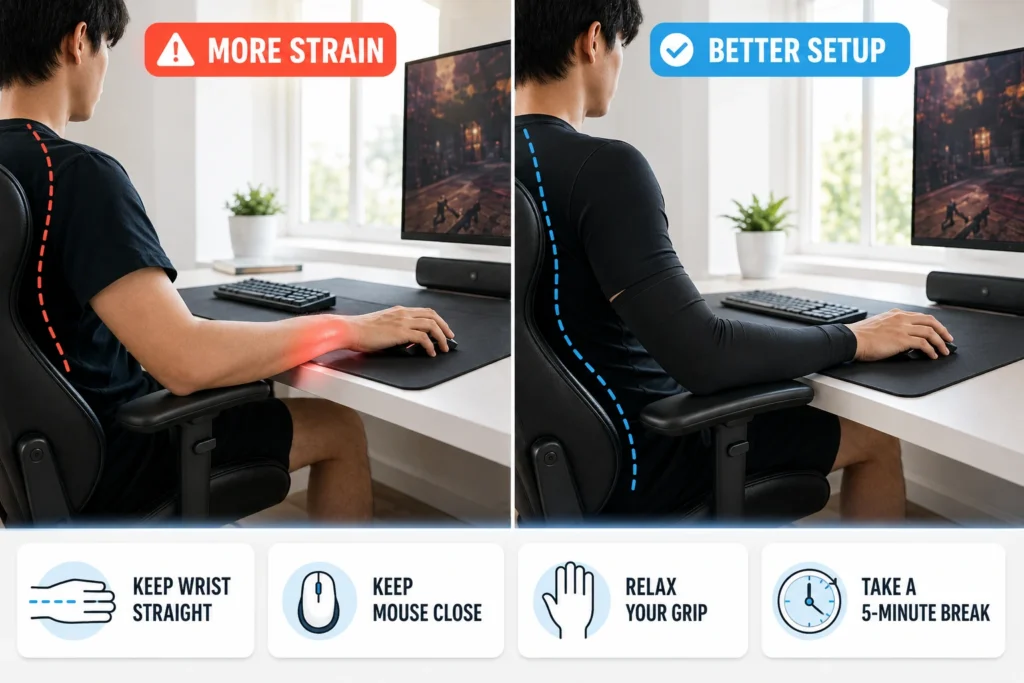
A sleeve cannot correct an awkward mouse position and OSHA workstation guidance recommends straight hands, wrists, and forearms. The forearms should remain close to parallel with the floor. Hard contact under the wrist also needs attention. The base of the palm can rest on a suitable support during a pause. The hand should remain free during mouse use. Breaks matter too. OSHA recommends a five-minute pause from computer tasks each hour. A short walk and a relaxed hand position give the muscles and tendons time to recover.
A 2024 New York Institute of Technology study examined lower-leg compression and a six-minute walk during two-hour game sessions. The research focused on leg blood flow, not forearm health. The study still shows why movement deserves attention during long periods at a desk. The American Journal of Physiology study provides the full research record. No sleeve can replace rest or regular movement.
Test It Against Your Bare Arm
Reviews cannot predict how one sleeve will react with your arm, room, and mousepad. Use the same game, sensitivity, mouse, pad, desk, and chair. Play several similar sessions with a bare arm and several with the sleeve. Note the details that matter. Check sweat, skin marks, heat, drag, arm comfort, and wrist position.
Sleep, activity, and daily habits can affect how your body feels during play. Health Wavy smart health and fitness tools can help you track those wider factors.
An aim-trainer score can add context. One high score proves little. Sleep, stress, warm-up time, and match difficulty can all affect performance. Several tests give a fairer answer than one match. Keep the sleeve if it removes sweat or friction without new pressure. Leave it off if the arm already glides well or the fabric creates another problem.
The Honest Health Answer
Gaming sleeves can help in a small and specific way and they may protect the skin from light friction, reduce sweat on the pad, and make long sessions more comfortable. Early esports research also suggests that a graduated compression sleeve may support forearm recovery after intense play. The main gaming study involved only 15 players, so the evidence remains limited. An ordinary sleeve cannot prevent repetitive strain injury, cure wrist pain, or treat carpal tunnel syndrome. It cannot correct poor chair height, a bent wrist, hard desk pressure, or hours of play without a break. Use a sleeve for sweat, skin drag, or light irritation. Treat pain, numbness, and weakness as health symptoms, not equipment problems.
Real Questions Players Ask
How tight is too tight for a gaming sleeve?
It should stay in place without restricting your arm and take it off if your fingers become cold or numb, your skin changes color, or the sleeve starts to hurt.
Will a sleeve make your aim better?
It can reduce drag and give your mouse arm a steadier glide. It cannot improve your accuracy, reactions, or skill without practice.
Can it ease wrist pain during play?
Less friction may make your arm feel more comfortable. A sleeve cannot heal tendon damage or remove pressure from a nerve.
Does it protect against carpal tunnel syndrome?
Research has not shown this protection. A gaming sleeve cannot relieve pressure on the median nerve or hold your wrist in a neutral position.
How long should you keep it on?
Try it for 30 to 60 minutes at first and remove it sooner if you notice heat, pressure, pain, numbness, or skin irritation.