

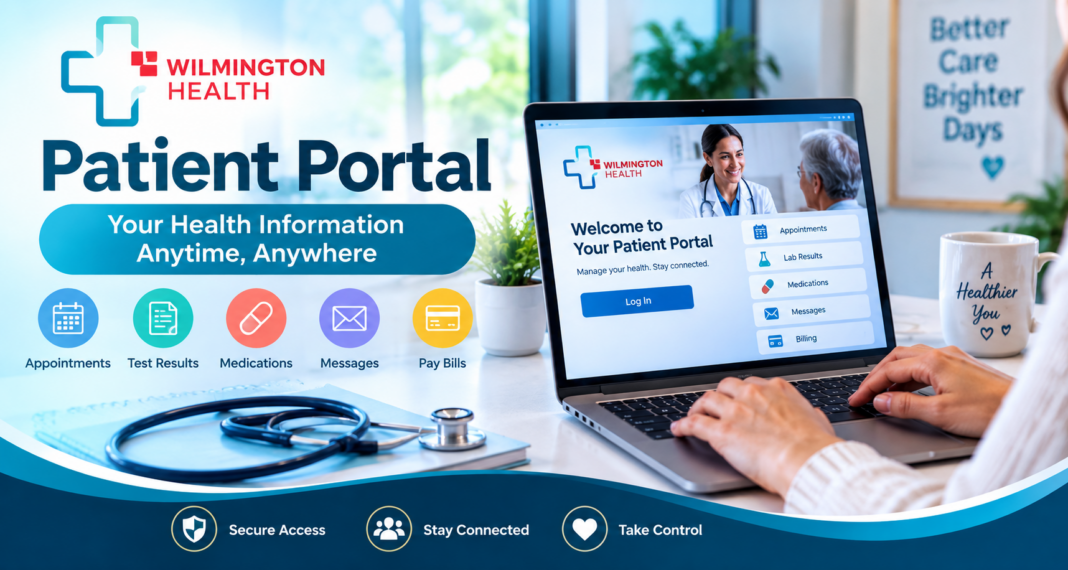
The Wilmington Health Patient Portal gives current Wilmington Health patients a secure online place to manage key parts of their care. Patients can check appointments, view lab results, review medications, request appointments, pay bills, and exchange messages with their healthcare team.
The portal is available to current patients who have a valid email address. Wilmington Health also states that portal access is limited to users in the United States and Canada. A new account may take up to two business days to authenticate before patient information becomes available.
If you are trying to use the portal for the first time, the process is fairly simple. The important part is knowing the difference between creating an account, waiting for authentication, and actually gaining access to your medical information.
A Quick Guide Before You Log In
The Wilmington Health Patient Portal acts as an online connection between a patient and Wilmington Health. It does not replace every phone call or office visit, but it can handle several routine healthcare tasks.
Patients can use the portal to:
- Check upcoming appointments and reminders
- View processed lab and test results
- Review medication information
- Request an appointment
- Request certain prescription refills
- Read messages from the healthcare team
- Send secure messages to a provider or nurse
- Access online bill payment
- Review parts of their health record
Wilmington Health also provides a PatientPORTAL mobile app for patients who prefer to use a smartphone.
The portal should not be treated as an emergency service. Wilmington Health directs patients with a medical or life-threatening emergency to call 911.
Wilmington Health Patient Portal Login
Existing users should start from the official Wilmington Health Patient Portal page rather than searching for a third-party login page. Open the Wilmington Health Patient Portal page and select Log-In Now. Enter the credentials associated with your portal account and follow any security prompts that appear.
Patients who received an enrollment email from Wilmington Health should follow the instructions in that email to complete their account setup. Wilmington Health also provides separate instructions for patients who received registration information from staff during an office visit. Once you have access, the portal dashboard provides links or icons for the services connected to your account.
Bookmarking the official portal page can make future access easier and may reduce the chance of entering healthcare credentials on an unrelated website.
Creating a New Portal Account
Patients do not necessarily need a PIN to start registration. Wilmington Health currently provides a self-registration process that allows eligible patients to create an account and then wait for the organization to authenticate it.
The basic process is:
- Open the Wilmington Health Patient Portal page.
- Select Log-In Now.
- Choose Create an Account.
- Enter an existing email account as requested.
- Complete the registration information.
- Choose No Pin as the registration option when applicable.
- Accept the terms and conditions.
- Complete the registration.
- Confirm your email address.
Wilmington Health must authenticate the account before patient data becomes available.
The registration form may ask for information such as your name, date of birth, gender, phone number, ZIP code, office location, email address, and a security question. Wilmington Health notes that the email address must be unique for each patient account.
Registration Is Not the Same as Full Portal Access
This distinction can prevent unnecessary frustration. Completing the online form creates your portal registration, but it does not mean your full medical information will appear immediately. Wilmington Health needs to authenticate a newly created account before patient data becomes available. The organization advises patients to allow up to two business days for this process.
That means an account can be created successfully but still have limited information at first. If you have just registered, waiting for authentication may solve the issue without creating another account. Creating several accounts with different email addresses can make the situation more confusing. Contact portal support instead if the expected authentication period has passed.
What You Can Do Once You Are Inside
The usefulness of the Wilmington Health Patient Portal becomes clearer after the account is active. It brings several routine healthcare tasks into one online location.
Check Upcoming Appointments
The portal can show information about upcoming appointments. Wilmington Health says patients can use the calendar icon in the portal to review details such as the appointment date, time, provider, and location.
Patients may also receive appointment information through text or email reminders before a visit. This can be useful if you booked an appointment weeks earlier and need to confirm where or when you are expected to arrive.
Request an Appointment
The portal supports appointment requests. Established Wilmington Health patients may also have access to other scheduling options depending on the provider and type of care.
A request should not always be confused with a confirmed appointment. Check the portal for confirmation or further instructions from the office.
Wilmington Health also offers virtual appointments through WH AnyWHere, and established patients can use the Patient Portal as one route to schedule virtual care.
See Lab and Test Results
Processed lab results can appear inside the portal. Wilmington Health directs patients to the results area through the beaker icon. The health system says lab results commonly take up to a week to process, although the actual time may be shorter or longer. If results have not appeared after more than a week, Wilmington Health suggests sending a portal message to request an update.
A result appearing in the portal does not always mean a patient should interpret it without medical context. Reference ranges, medical history, current medications, and the reason for the test can all affect what a result means. Questions about a result should go to the appropriate healthcare professional.
Review Medication Information and Request Refills
Medication information is another part of the portal. Patients may also use portal tools to request a refill.
A refill request for an existing condition is different from asking a clinician to prescribe or change treatment for a new health concern. Wilmington Health notes that certain patient-initiated messages involving new symptoms, multiple concerns, or medication changes may qualify as billable medical care.
That distinction matters. A simple administrative message may require little clinical work, but a message that asks a clinician to assess a new medical problem can effectively become a form of medical evaluation.
Secure Messages Can Be Useful but They Have Limits
Portal messaging gives patients a direct digital route to their healthcare team. It works well for questions that do not require immediate attention. Wilmington Health says patients can use portal messages to communicate with clinical staff. Its patient guidance also notes that nurses may not always answer calls immediately because they may be helping patients in the office.
Good portal messages are usually focused. State the reason for the message clearly and include enough relevant information for the care team to understand the request. The portal should not be used when a condition requires emergency attention.
A Portal Message May Sometimes Lead to a Charge
This is one detail patients can easily miss. Wilmington Health states that a small percentage of patient-initiated secure messages may meet criteria for billing. Examples can include messages about new or unexpected symptoms, two or more concerns, questions about changing medication, or medication requests connected to a new symptom or concern.
Simple questions are generally different. Wilmington Health lists examples such as certain refill requests for an existing condition, brief medical updates, appointment requests, and some questions related to recent surgery as messages that are not billed under the circumstances described on its portal page.
Patients with a concern that requires a detailed medical assessment may find that an office or virtual visit is more appropriate than a long portal message.
Accessing Your Personal Health Record
The portal can provide more than individual lab results. Wilmington Health has instructions for requesting a Personal Health Record, also called a Continuity of Care document. After logging in, patients can open My Chart and choose the option to request a Personal Health Record.
The generated document can contain medical-history information from the Wilmington Health record which is the part of the broader process of Health Information Management. Wilmington Health states that requesting the record can also populate My Chart with current visit data. Results may not populate until they have been reviewed by the provider. This feature can be useful when you want a broader view of the information held in your medical record rather than checking one result at a time.
Paying a Wilmington Health Bill Online
Online bill payment is listed among the services available through the Wilmington Health Patient Portal. Wilmington Health also maintains a separate online bill payment service within its patient-services resources. Before paying, review the account information and make sure the charge matches the service you received.
Questions about a Wilmington Health bill should go to Patient Account Services. The current portal page lists 910-3954188 as the contact number for billing questions during local business hours.
Medical billing and portal technical support are different issues. A portal support team may help with access, but questions about the amount owed or a particular charge belong with the billing department.
Using the PatientPORTAL App
Patients do not have to rely only on a desktop or laptop. Wilmington Health promotes a Patient PORTAL app for smartphone access. The organization says the mobile option allows patients to perform portal tasks such as checking test results, viewing appointments, and communicating with providers from an iPhone or Android device.
Mobile access can be useful for checking appointment details before leaving home or reading a provider message without opening a computer. Use the download links provided through Wilmington Health’s official portal resources when possible. This helps avoid confusion with apps that have similar names.
Parents, Dependents and Proxy Access
Healthcare portal access becomes more complicated when one person needs to help manage another person’s care. Wilmington Health supports dependent and proxy access. Its self-registration process includes an option to add a child dependent, and adult patients can establish proxy access for another person.
For an adult patient’s proxy account, the patient can go to My Account, find the associated accounts area, and choose the option to add a proxy. The requested information can include the proxy’s name, gender, date of birth, phone number, email address, relationship to the patient, and an optional end date.
The proxy then receives an email to accept and verify access. A proxy who is not already a Wilmington Health patient may need to complete registration before access can be used. Once set up, the proxy can use the account-switch option to reach the patient’s portal. This setup is safer than simply giving another person your own username and password because it creates separate authorized access.
Your Lab Result Is Missing Even Though You Had the Test
A missing result does not automatically mean something has gone wrong. Wilmington Health says processed lab results post to the Patient Portal and notes that processing can commonly take up to a week. Certain tests may take longer. The organization also states that if lab results contain emergent indicators, a member of the healthcare team will contact the patient.
If more than a week has passed, patients can send a portal message and request an update. Another option is to request an updated Personal Health Record through My Chart. Wilmington Health notes that this can refresh current visit data, although results still depend on provider review.
Common Login and Registration Problems
Portal problems are often related to account setup rather than the healthcare record itself. A newly registered account may still be under authentication. Wilmington Health advises allowing up to two business days before full patient data becomes available.
An unconfirmed email address can also prevent the registration process from finishing correctly. Patients who self-register are instructed to confirm their email for future logins. If you received a registration email directly from Wilmington Health, follow the instructions in that message rather than starting another registration from scratch.
Patients who continue to have trouble can contact Wilmington Health’s portal support tea. The organization lists 9103954188 for assistance with registration or login.
The Portal Does Not Replace a Full Medical Records Request
A patient portal and a complete medical-record request serve related but different purposes.
The portal gives patients convenient access to information such as results, appointments, medications, messages, and available health-record data. Wilmington Health separately provides a Medical Records service for patients who need to request copies of their records.
This difference matters if you need records for another physician, an insurance issue, a legal matter, or your own files. Do not assume that every document held by the healthcare organization will automatically appear on the portal dashboard.
Protecting Your Portal Account
A patient portal contains private health information, so basic account security matters. Use a password that you do not reuse on unrelated websites. Keep your email account secure because account notices and registration information may arrive there. Avoid saving login credentials on a public or shared computer.
Sign out when you finish, especially on a device used by other people. Do not send your password through ordinary email or text. Patients who want a trusted person to manage their healthcare information should use Wilmington Health’s dependent or proxy features rather than sharing personal login credentials.
Wilmington Health Patient Portal Access Outside the United States
Travel can create an unexpected access problem. Wilmington Health specifically states that its Patient Portal can only be accessed within the United States and Canada.
A patient who normally uses the portal without difficulty may therefore find that access does not work during travel in another country. This restriction is worth remembering before an international trip, especially if you expect to need appointment details, messages, or health information while away. Important information needed for travel should be arranged in advance rather than relying on portal access from another country.
When Calling the Office Makes More Sense
Digital access is convenient, but not every healthcare problem belongs in a portal message. Call the appropriate Wilmington Health office when a concern needs faster attention, when scheduling is complicated, or when portal communication does not provide enough information.
A virtual or in-person appointment may make more sense when you have a new symptom, several medical concerns, or a problem that requires examination, testing, or a detailed treatment decision.
A life-threatening or medical emergency requires immediate emergency assistance rather than a portal message. Wilmington Health directs patients with such emergencies to call 911.
Getting Help With the Wilmington Health Patient Portal
The best support route depends on the problem. Portal registration and login problems can be directed to Wilmington Health portal support. Wilmington Health also lists 910-395-4188 for patients who need help with portal registration or login. The same phone number is listed for Patient Account Services when patients have billing questions.
Questions about symptoms, test results, prescriptions, or treatment should go to the appropriate healthcare team rather than technical support.
The Wilmington Health Patient Portal is most useful when patients treat it as a practical healthcare tool rather than just a place to check test results. Once an account is authenticated, it can bring appointments, lab information, medications, messages, bills, and parts of the health record into one secure location. Knowing when to use the portal, when to contact the office, and when a medical concern needs immediate care makes that access far more useful.